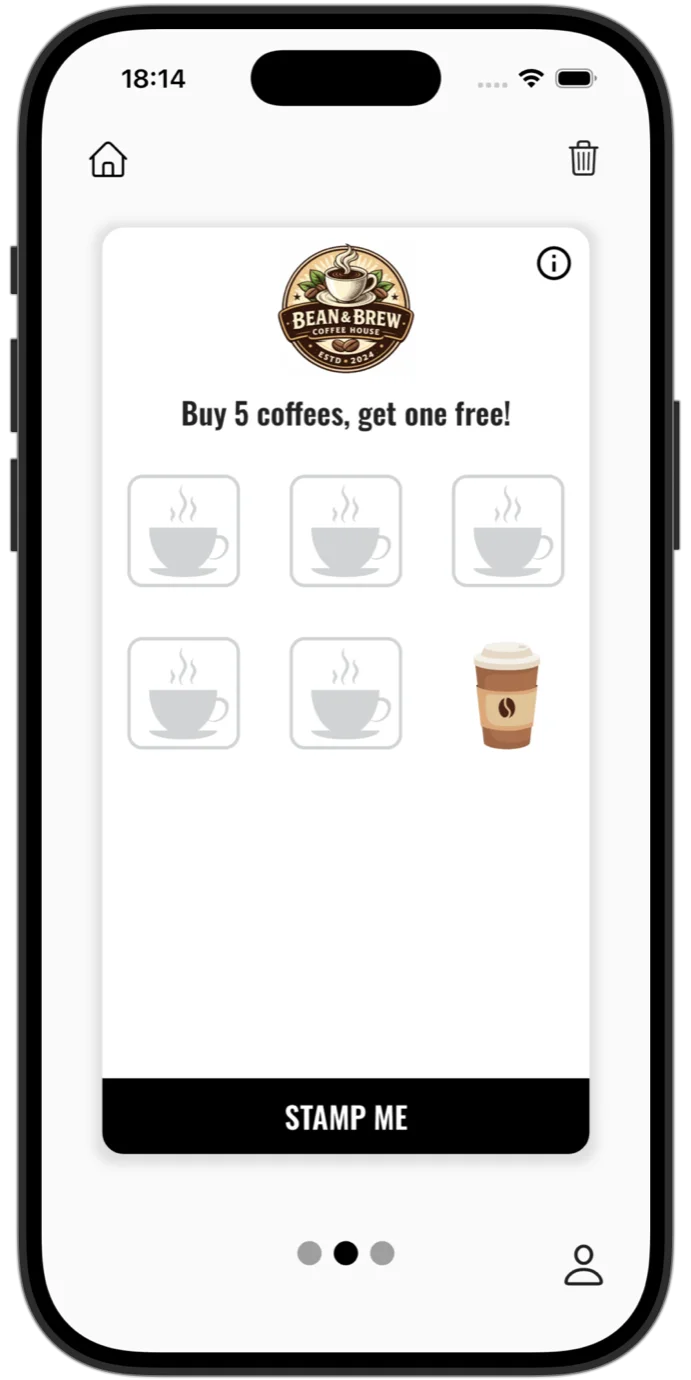


Loyalty cards with stamps or points
You choose the offer type: stamps, for places where the customer buys roughly the same thing, or points, for bills that vary. You set the threshold and the reward, and the customer sees their progress in real time on the card in their phone.
- Several reward types on the same offer, and the customer chooses when they reach the threshold.
- Stamp artwork personalised for your business, not just generic ticks.
- Several offers on the same card, depending on the plan: for example stamps on coffee and points on the rest of the menu.
If you need inspiration, you will find examples of thresholds and configurations in the 20 loyalty program ideas and in the guides for each type of business.
The back of the card with your business details
The card also has a back, which you fill in yourself: your phone number, address, website, menu link and your Facebook and Instagram pages.
The details are not just text: the customer taps the number and calls you, taps the address and Google Maps opens straight away. The loyalty card becomes your business card as well, always in the customer's phone.
A listing in the Stampino app
Your business is visible to users searching nearby, not only to customers who already know you: the Stampino app is used by more than 65,000 users, who keep all their loyalty cards in one place.
The list of partner businesses is ordered by distance, so a user nearby sees you among the first results. The listing therefore brings in new customers as well, not just returning ones.
A QR code that adds the card instantly
The customer can add their card in a single scan, with the sign-up QR code: you put it on the counter, on the table or in the window, and the card lands on their phone in a few seconds, with nothing to search for.
The poster and the sticker with the code are generated print-ready from the admin panel.
Availability depends on the plan: the sign-up QR code comes with the Standard plan and up. On the plans below it, the generic QR code guides the customer to download the Stampino app, and the card for your location is then added manually, from the app.
A card in Apple Wallet and Google Wallet
The Stampino app is compatible with Apple Wallet: the generic card, the one the customer scans with at the till, can be added straight into the phone's wallet.
And if you prefer the option where no app needs to be installed, the Lite plans deliver the card exclusively through Apple Wallet and Google Wallet: the customer scans a QR code and adds the card in a few seconds. No app, no account, no password.
How it works exactly, with its steps and its limitations, is described in the Wallet card guide.
Push notifications to your customers

Weekend offer
This Saturday, your second coffee is on the house. See you!
You send announcements straight to the phones of customers who hold your card: a new offer, a seasonal product, special opening hours for the holidays.
Notifications can carry an image and a link, and the number of sends per month depends on the plan. You send them on the spot or schedule them in advance, for example Friday morning for the weekend offer.
For each notification you see how many customers opened it and how many interacted with it, so you know which messages produce results and which go unnoticed.
An automatic reward on the customer's birthday
Happy birthday!
There is a coffee on the house for you today. Come and get it.
You set the reward once, and it appears on the customer's card on their birthday by itself, with a claim window you decide. You keep no record of birth dates.
A simple gesture that brings one extra visit on exactly the day the customer is celebrating somewhere anyway.
An expiry period for offers
You can set a limit after which the progress on the card resets, useful when you want stamps collected within a particular window rather than indefinitely.
The customer does not have to remember it: they are notified automatically 7 days before and once more the day before, and the expiry date shows on their card.
Advanced statistics
Peak activity
Stamps & rewards
May 2026Customer retention
Returned within 7 days
You understand which offers work, when customers return and what results the loyalty program brings: you see how many cards were issued, how many stamps were given and how many rewards were collected.
The larger plans include the advanced statistics:
- Peak hours, on a map of the whole week.
- Monthly trends in stamps and rewards.
- Customer retention: how many return within the first 7 days.
- All the activity, broken down by location.
- Export to Excel, at any time.
You can also attach context to each scan: options you define, which the employee picks from at the till, such as "Morning shift" or "Happy hour", so the statistics show when and under what conditions each stamp was given.
Dynamic fields go a step further: they ask the cashier to type or scan a value with every scan, for example the receipt number, so you have the guarantee that each stamp has a real receipt behind it.
Team, locations and permissions
- Separate accounts for employees, with granular permissions: who can stamp, who sees the statistics, who edits the offers.
- Several work points on the same subscription, with activity tracked per location.
- Every action at the till happens from the employee's phone, with their own account. Or you configure a single account per location, and the employee selects their profile with each action: the same context options described under statistics, only defined with employee names, so each stamp has someone accountable behind it.
No extra hardware at the till, and the option of POS integration
Stampino works with the phones you already have: it needs no extra equipment and nothing installed on the till. The employee scans the customer's code with their phone, and the stamp appears on the card instantly.
A scan can also carry a quantity, so double-stamp days or large bills are handled in a single scan. And if you want stamps to go out straight from the till, there is also a POS integration API.
You manage all the features above from wherever is easier for you: from the Stampino mobile app or from the admin panel, straight in the browser.
Start with your first card
You choose the offer type, the threshold and the reward from the admin panel, and your customers get the card on their phones. Any setting can be changed later.
Register your businessFrequently asked questions
How much does it cost?
A plan with a listing in the Stampino app starts at 36.50 EUR a month, plus VAT where applicable. If you only want the card in Apple Wallet and Google Wallet, the Lite plan costs 10 EUR a month, plus VAT where applicable.
See all plansHow does payment work?
From the admin panel, secured by Stripe, by bank card, monthly or yearly as you choose. The invoice is issued and emailed automatically with every payment and stays available in the panel.
Can I start on my own, with no installation or visit from you?
Yes. You set up your account online: you choose the offer, personalise the card, pick a plan and pay by card. There is nothing to install at the till and you need no extra equipment.
What does the customer install?
The Stampino app, from the App Store, Google Play or AppGallery, with no account and no password. And on the Lite plans they install nothing: the card goes straight into Apple Wallet or Google Wallet.
Can I change the offer after launch?
Yes, at any time, from the admin panel. The offer type, the threshold, the reward and the expiry period can all be changed without affecting the cards or your customers' progress.
Can I use only the QR menu, without a loyalty program?
Yes, the QR menu also exists as a standalone product. And from the Standard loyalty plan up, or with the Lite Plus wallet plan, it is included free.
See all plansSee also coffee shops, restaurants, stores, salons, gyms, car washes, wallet-only card, apps for coffee shops, digital or punch cards, common mistakes, 20 loyalty program ideas, customer retention or the digital QR menu.